“Operate. Track. Improve. With Petra Business Suites, every part of your business moves forward — because what gets measured, gets mastered.”
Loading
“Operate. Track. Improve. With Petra Business Suites, every part of your business moves forward — because what gets measured, gets mastered.”
Turning Routine Billing into a Hands-Free, Recurring Process
Invoicing is essential for every organization, but managing it manually can be time-consuming — especially for retainers, subscriptions, or recurring services. Petra Business Suites solves this challenge with its Automated Invoicing module, allowing organisations to schedule, generate, and send invoices automatically based on defined recurrence rules.
This ensures timely billing, consistent cash flow, and reduced administrative overhead — all while maintaining brand accuracy and financial precision.
(See image: “generated_automated_invoices.png”)
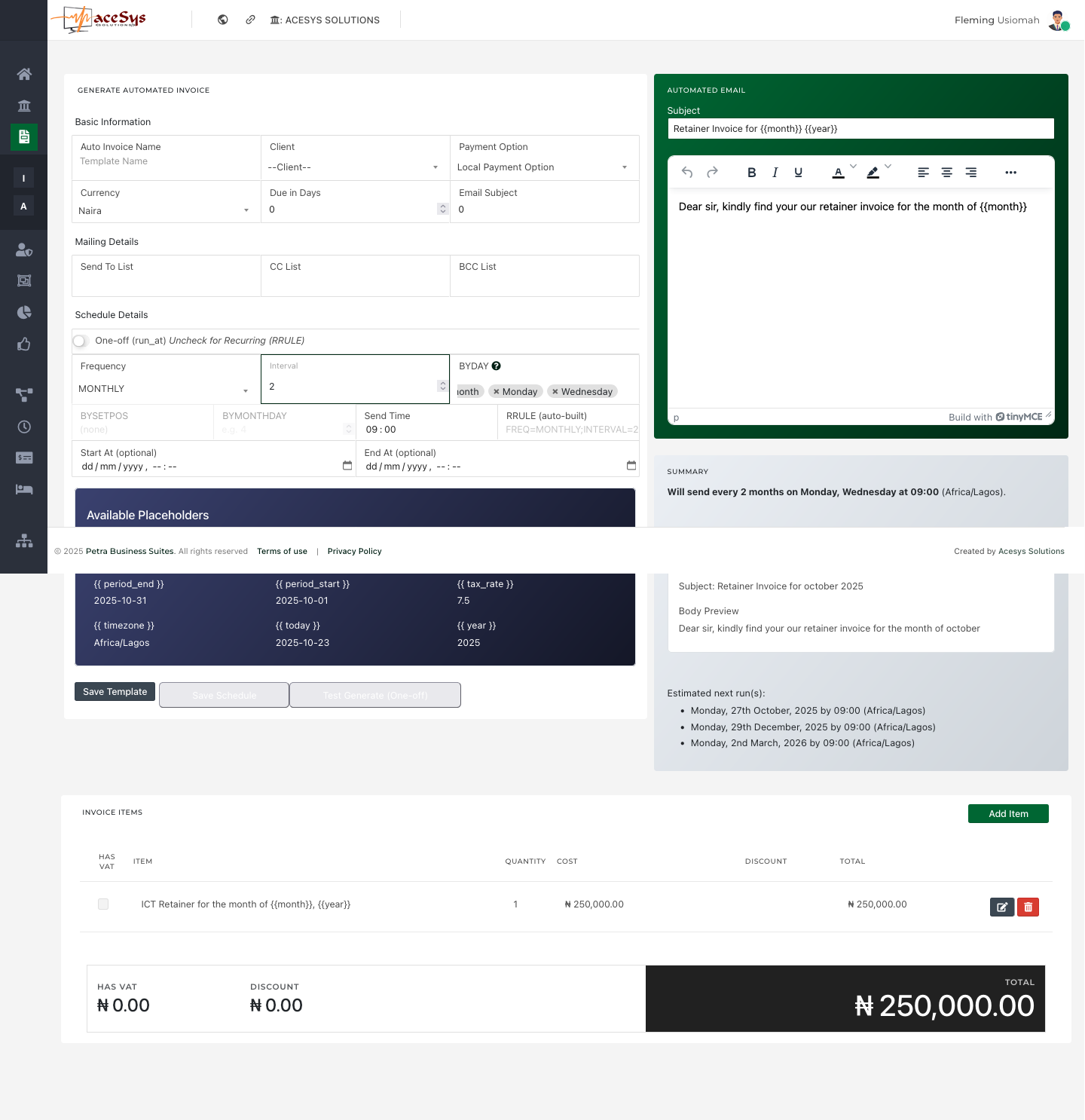
Automated Invoices in Petra are built around flexibility and control. The setup screen is divided into clear sections that make it easy to define how and when invoices are generated and sent.
Here you define the foundation of your recurring invoice:
Define who receives the invoices and how they’re copied:
This integrates tightly with Petra’s invoice email settings, using either your organization’s default SMTP or a dedicated channel for invoicing correspondence.
Petra’s automated invoicing leverages calendar-based scheduling to run on a recurring pattern you control:
Each automation comes with a summary panel showing:
This ensures you always know when and how future invoices will be sent.
The built-in email editor allows you to compose or customize the message accompanying each automated invoice. You can personalize it using dynamic placeholders, such as:
{{month}}, {{year}}, {{due_in_days}}, {{tax_rate}}, {{period_start}}, {{period_end}}, etc.When the invoice is sent, Petra automatically replaces these placeholders with live data — ensuring accuracy and contextual relevance without manual editing.
You can also predefine the invoice line items within each automation:
This ensures that every generated invoice maintains consistent pricing and formatting aligned with your invoice template and branding.
 (See image: “automated_invoices.png”)
Once automation is created, it’s listed under the Automated Invoices page. This view allows you to:
Each automated invoice template operates as a standalone workflow — generating and emailing invoices on schedule without further intervention.
Automated invoices inherit configuration and styling from your Invoice Settings module, ensuring consistency and compliance:
This means every automated invoice looks identical to manually generated ones — complete with your logo, brand colours, contact info, and signature.
With Petra’s Automated Invoicing, you can set it once and let the system handle the rest. From recurring retainers to monthly maintenance contracts, the module ensures every invoice is generated, branded, and delivered automatically — while giving you complete oversight and control.
In short, Petra transforms invoicing from a reactive process into a proactive revenue engine — freeing your team to focus on delivery rather than documentation.

Book a walkthrough and we will show how Petra connects the ideas in this article to real work tracking.
Petra Support
Share your details so our team can keep the conversation connected if you come back later.